
Consultation booking.
Get straight to the conversation.
Replace scheduling messages with a clear service and a choice of available times. Booking Spot lets consultants and coaches offer a free discovery appointment or a paid session, collect useful context and keep control of their working day.
Start free: one active service, unlimited bookings and team members.
Why Booking Spot
fits your day.
Discovery calls, paid consultations and one-to-one coaching sessions.
- Reserve focused time
- Set recurring office hours and leave a buffer for notes before or after a call. Booking limits can cap the number of appointments you accept in a day, week or month.
- Understand the request before you meet
- Ask clients what they want to discuss through service-specific text, choice or date questions. Make essential answers required so the conversation starts with context.
- Account for an already busy calendar
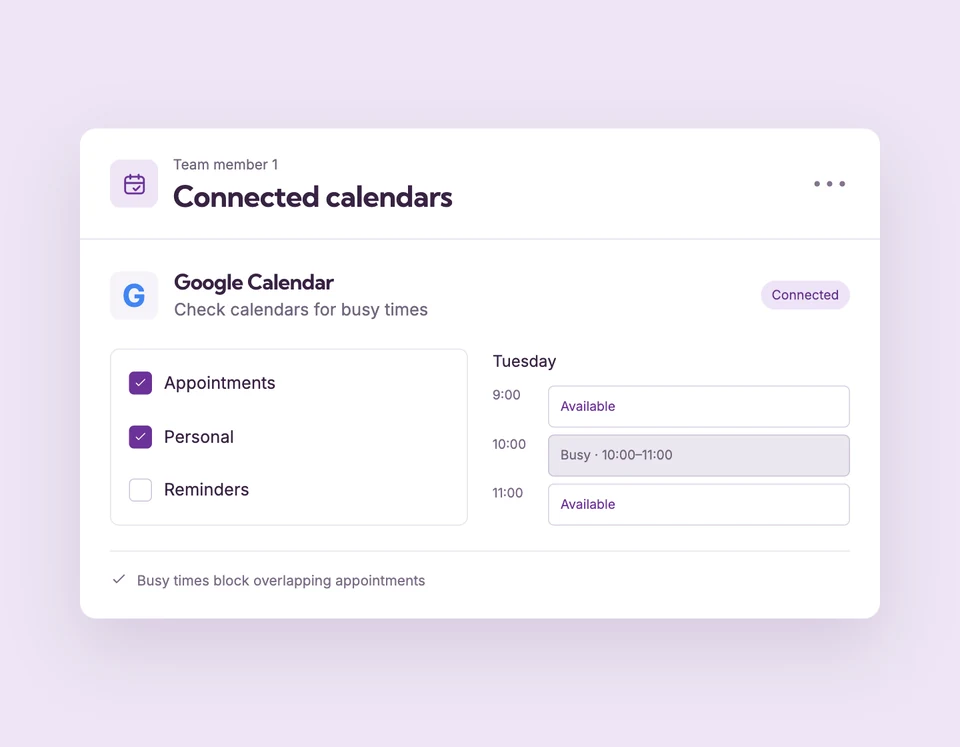
- On Starter or Pro, connect a Google account per professional and select calendars whose busy events should block appointments. Optional appointment sync sends confirmed bookings to a writable calendar.
One booking.
Thought through.
Create a free 30-minute discovery consultation with a 15-minute note-taking buffer. Ask for the client’s main goal and cap the service at four appointments per day. Add the meeting instructions to your service information.
Try the interactive booking demoExample setup · illustrative details
- Session
- 30-minute discovery consultation
- Intake
- Main goal for the meeting
- Daily limit
- 4 appointments
From account
to first booking.
Start with the service your customers ask for most. Your first test booking helps you check the details before going live.
- Add your consultation hours and time zone.
- Create a free or paid session with useful intake questions.
- Share the booking page and confirm the meeting instructions clients receive.
Choose where customers book.
- Your own websiteShare a hosted page or embed your calendar.
- WixAdd a calendar that fits your Wix site.
- ShopifyTurn your product pages into bookable services.
Compare Free, Starter and Pro for reminders, Google Calendar and waitlist features. Availability and payment options depend on your platform and saved settings.
Before you get started.
Can I offer both free and paid consultations?
Each service can be free, paid online through an available provider, or paid at the appointment. Free supports one active service; publish additional services with Starter or Pro.
Does it create video meeting links automatically?
Set and communicate your meeting location or link using your existing meeting workflow. This page does not promise an automatic Zoom, Teams or Google Meet integration.
Can I use Booking Spot on my website, Wix or Shopify?
Yes. Standalone businesses can share a hosted booking page or embed the calendar. Wix businesses add the Booking Spot calendar to a page. Shopify businesses connect services to products and add the Booking selector. Follow the setup guide for your platform.
What is included when I start free?
Free includes one active service, unlimited bookings and team members, hosted pages, widget customization, booking questions and waivers, and standard confirmation and update emails. Starter adds reminders and Google Calendar checks. Pro adds waitlists. Payment processing fees are separate.
Your next booking starts here.
Create your account, add your first service and publish a booking page. Start free with one active service, unlimited bookings and your whole team.