
Booking forms & waivers.
Before the appointment.
Give each service a form that fits the visit. Ask for preparation details, let customers choose an option and keep any required waiver in the booking flow.
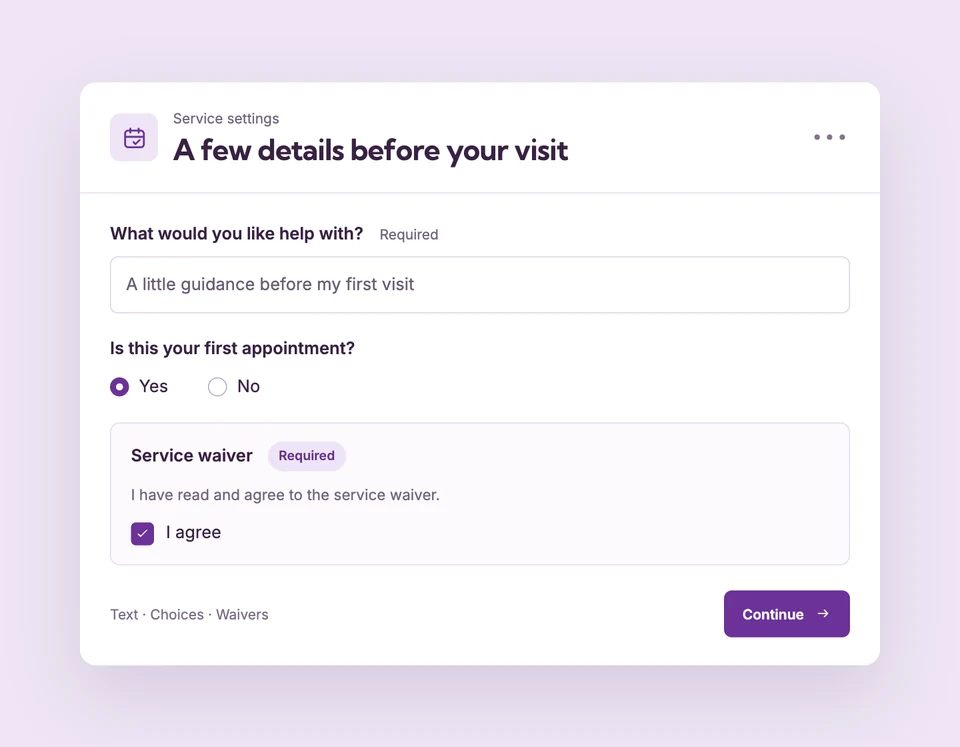
Custom questions and checkbox, typed-name and signature waivers are included in Free. Compare plans
The right questions.
Set up Questions & waivers for your business.
Choose the customer details
Set phone and notes to optional, required or hidden. Use the business cancellation acknowledgement, require acceptance for this service or hide its checkbox.
Add questions that matter
Choose short text, long text, dropdown, checkboxes, radio buttons or a date. Add helpful wording and mark the answers that are required.
Choose waiver acceptance
Show your agreement text or HTTPS link, then ask for a checkbox, typed name or drawn signature. Save and preview the real form.
A consultation with context.
Not another blank form.
Ask what the customer would like to discuss, offer a choice of goals and collect a required agreement. Reorder or remove questions as the service changes without rewriting the answers on existing bookings.
The details
that matter.
Know what the feature does, how it is configured and where its limits are.
- Different forms for different services
- Questions belong to the service you edit. Another service can ask something different.
- Required means required
- Required answers and waivers stay in the flow. A shorter Shopify checkout does not remove required consent.
- Answers stay with the appointment
- Review Booking answers in Calendar. Saved waivers preserve the wording and acceptance method shown when the customer booked.
Before you get started.
Answers about Questions & waivers, with guides for the next step.
Can customers sign on a phone?
Yes. A signature waiver accepts a drawn signature with a finger or mouse and includes clear and keyboard controls. Typed-name and checkbox methods are also available.
Can I delete or reorder questions?
Yes. Add, remove and reorder service questions, then save. Existing booking answers retain the questions shown at the time of booking.
Are my waiver and question texts translated automatically?
No. Widget language packs translate the surrounding interface. Service questions, answer choices and waiver wording remain as you entered them.
Take a closer look.
Try the sample calendar, then follow the guide when you are ready to set up your business.
Explore the related guide