
Staff availability.
A clearer day for everyone.
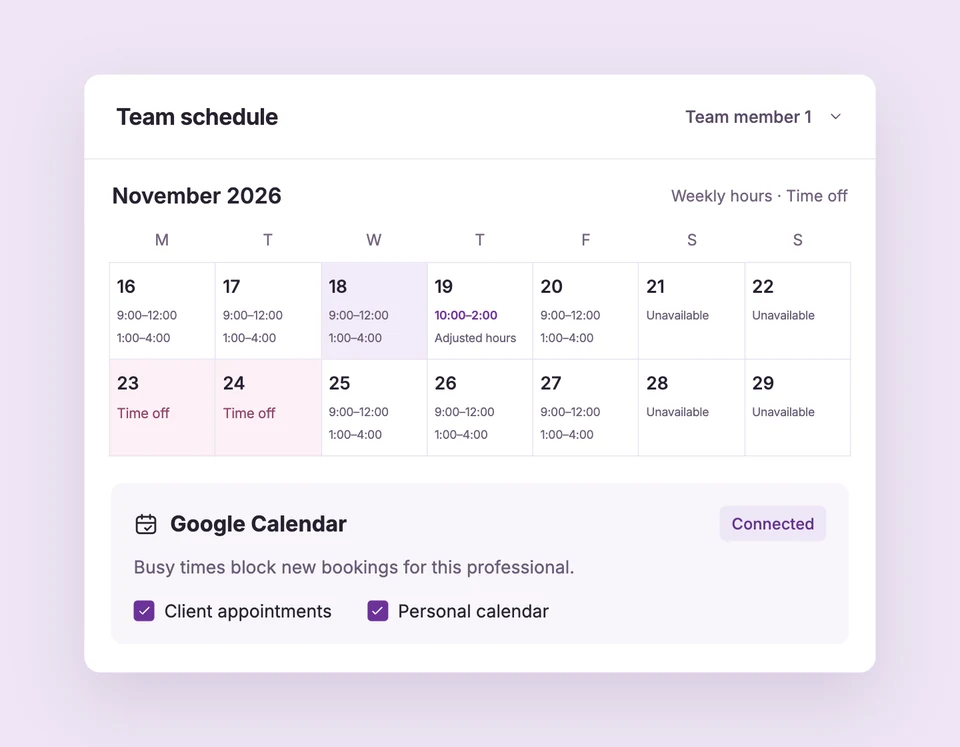
Give every professional their own working hours and assign them to the services they provide. Customers see times that fit the whole appointment, not just a free start on the clock.
Unlimited team members are included in Free. Free supports one active service; Starter and Pro support multiple services. Compare plans
A schedule for each person.
Set up Team scheduling for your business.
Add your professionals
Create each person in Team and set the days and working periods they accept appointments. Separate periods allow a lunch break.
Assign the right services
Select the professionals who offer each service. You can also add someone from the service editor without losing your service edits.
Plan and check availability
Use the month or three-month schedule to review hours and exceptions. The appointment Calendar shows actual bookings.
Booked from 9 to 11?
The whole two hours count.
If one professional is booked from 9–11 a.m., customers cannot book an overlapping 9:30 or 10 a.m. start with that person. Another professional may remain available if their schedule and any shared resources allow it.
The details
that matter.
Know what the feature does, how it is configured and where its limits are.
- Recurring hours
- Start with weekly hours, then replace them on specific dates when the normal pattern changes.
- Pause new bookings
- Turn off Accept bookings for a person without deleting their profile or existing appointments.
- One consistent schedule
- The same availability powers the widget, Shopify blocks and hosted booking pages.
Before you get started.
Answers about Team scheduling, with guides for the next step.
Is this an employee shift or payroll system?
Booking Spot manages availability for customer appointments. It does not calculate payroll, attendance wages or employee shift coverage.
Can customers choose a professional?
Yes. Assign eligible people to the service. Widget settings can automatically select the only professional when just one is available.
Does changing working hours cancel appointments?
No. Changes affect new availability. Review existing appointments in Calendar and contact customers if something needs to move.
Take a closer look.
Try the sample calendar, then follow the guide when you are ready to set up your business.
Explore the related guide