
Your appointment waitlist.
Ready for the next opening.
A cancellation does not have to be the end of the story. Let Booking Spot invite a matching customer who already asked for that service and day.
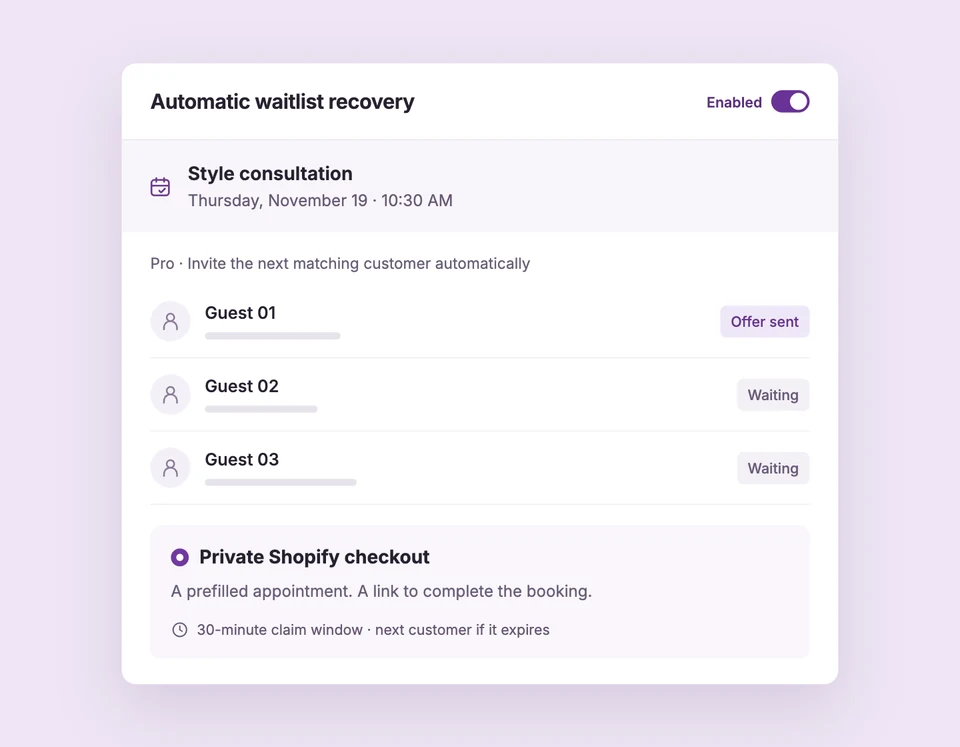
Automatic recovery is included in Pro. Eligible first subscriptions have a 7-day trial.
A time opens.
Your waitlist gets a turn.
Your team should not have to start a round of calls whenever someone cancels. Keep the request, the invitation and the booking connected.
Match the opening
A cancellation, decline or reschedule frees a future time. Booking Spot checks the service, date, professional and availability against the waitlist.
Invite the next matching customer
The oldest matching request gets an opening email. Eligible paid Shopify services can send a private checkout invitation with up to 30 minutes to act.
Keep the queue moving
If that private invitation expires, Booking Spot checks the time again before inviting the next customer. A booking or an active checkout hold stops the next invitation.
The gap in your day.
Someone else’s ideal time.
A salon consultation at 10:30 is cancelled. A customer has already joined the waitlist for that service and day. Instead of leaving the request in a spreadsheet, Booking Spot can send an invitation while the time is still available.
The same flow works for eligible appointment services offered by consultants, studios and other service businesses.
Release a time in the demoAutomatic follow-up.
Your booking rules.
Recovery respects the appointment settings you already use.
- The right request
- Match the service, requested day and professional. Customers opt in to being contacted about an opening.
- A clear time window
- Timed private Shopify invitations last up to 30 minutes, shortened when your booking notice requires it.
- Availability checked again
- An invitation is an opportunity to book. The time is rechecked before checkout, and payment must be verified before a paid booking confirms.
- Manual when you need it
- Review requests and choose Notify of opening yourself. Booking-page links also support free and pay-at-appointment services.
Put your waitlist to work.
Use Pro to collect requests, send invitations and enable automatic recovery. Timed private checkout requires an eligible paid Shopify service.
Before you turn it on.
What gets sent, who can receive it and when an appointment is confirmed.
How does automatic appointment waitlist recovery work?
When a cancellation, decline or reschedule frees a future appointment, Booking Spot can contact the oldest matching waitlist request. It checks the service, date, professional and current availability. For eligible paid Shopify services, a timed private invitation can move to the next matching customer if it expires and the time is still available.
Which plan includes the waitlist?
Customer waitlist signup, opening invitations and automatic recovery are included in Pro. An eligible first Pro subscription includes a 7-day trial, starting after you approve it. The Free plan still includes one active service, unlimited bookings and team members, and Shopify publishing and checkout.
Does an invitation reserve the appointment?
No. An invitation gives a customer the opportunity to book. Availability is checked again before a temporary checkout hold begins. For paid services, the appointment is confirmed after payment is verified. An invitation does not guarantee that the opening will be booked.
What happens if a customer does not book?
An automatic private Shopify invitation lasts up to 30 minutes. Your booking notice window may shorten it. If the invitation expires, Booking Spot checks availability before contacting the next matching customer. An active checkout hold is respected before another invitation is sent.
Can I use the appointment waitlist without Shopify?
Yes. Free and pay-at-appointment services can use invitations that open a booking page, and your team can send opening notifications manually. Timed private checkout invitations and automatic expiry handoff require an eligible paid Shopify service. Pro is required for waitlist features in either setup.
What do I need to enable before recovery starts?
Enable waitlist signup, customer emails and the Waitlist signup and Opening available messages. For timed Shopify recovery, connect a paid service to its product, allow draft-order access and enable Automatically offer paid Shopify openings. Adding working hours alone does not trigger an automatic invitation; review those openings manually.
See what happens
after a cancellation.
Try a sample opening, an expired invitation and the next customer in line.