
Your online
booking system.
Give clients a place to choose a service, a professional and an available time. Share a Booking Spot page or add a booking widget to your existing website.
Start free with one active service, unlimited bookings and team members.
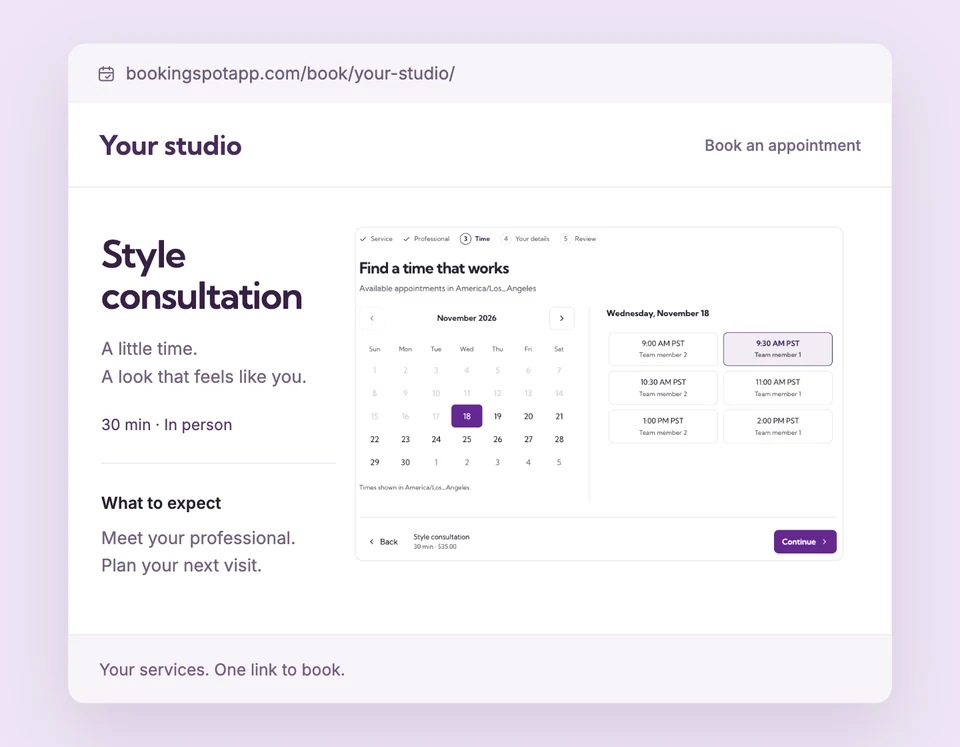
A link to share.
A calendar to embed.
Your hosted business page lists the services you publish. Give a specific appointment its own service link, or embed the calendar on a site that supports the required embed code.
Explore hosted booking pagesA schedule
that makes sense.
Set professional hours, breaks, time off, service duration and buffers. Require shared rooms or equipment when needed. Customers see appointment times that fit the full booking and its saved availability rules.
See team availabilityYour booking form.
Your brand.
Customize the calendar’s colors and wording, collect practical intake answers and add required waivers. Preview the customer flow before publishing the page.
Customize your booking widgetChoose how
customers pay.
Offer a free appointment or collect payment at the visit. For online payments, connect an available Stripe, Square or PayPal business account and assign it to your service. Provider processing fees still apply.
Explore payment setupSet up your first service.
- Create your account and add your business details.
- Add a professional, working hours and your first appointment service.
- Customize the calendar, test the booking flow and publish your link.
Before your first booking.
Can I start taking bookings on the Free plan?
Yes. Free includes one active service, unlimited bookings and team members, hosted booking pages, widget customization, questions and waivers, and booking confirmation and update emails. Your service can be free or paid. Upgrade when you need more active services or advanced automation.
Can I use Booking Spot without Shopify?
Yes. Share a hosted booking page or embed the calendar on your website. You can offer free appointments, collect payment at the visit, or connect an available Stripe, Square or PayPal account for online payments. Your payment provider’s processing fees still apply.
Can customers choose a team member?
Yes. Assign professionals to each service and set their individual availability. When only one service or professional is available, you can automatically select it to shorten the booking flow. Both shortcuts are configurable in Widget → Booking flow.
Can I add questions or require a waiver?
Yes. Add short text, long text, dropdowns, checkboxes, radio buttons and date questions to each service. Waivers can use a checkbox, typed name or drawn signature. Choose which answers are required, reorder questions or remove them. Questions and waivers are included in Free.
Your next booking starts here.
Create your account, add your first service and publish a booking page. Start free with one active service, unlimited bookings and your whole team.