
Shopify appointment booking.
Now bookable appointments.
Let customers choose a service, professional and available time on your storefront. Your team manages appointments in Booking Spot while paid orders stay in Shopify.
Free includes one active service, unlimited bookings and team members, product publishing and Shopify checkout. Compare plans
Your Shopify products.
Set up Shopify booking for your business.
Set up your team and service
Add working hours, assign the people who offer the service and choose its duration, price and payment method.
Add the Booking selector
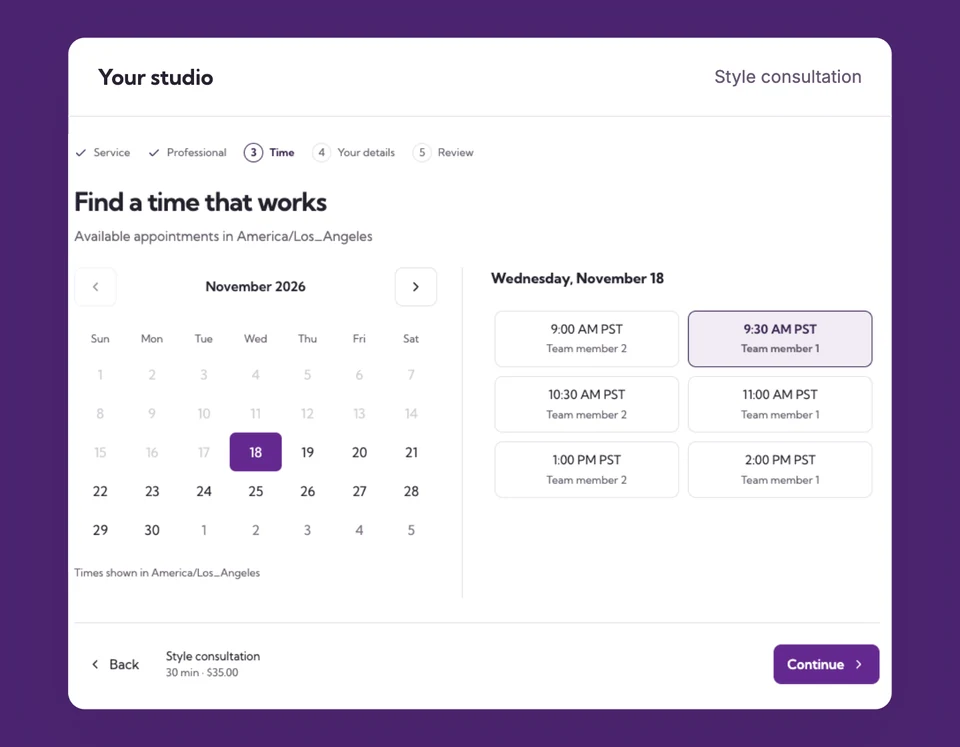
Create a dedicated product template and add the app block. Choose an embedded calendar or a button that opens it. The block finds the linked service automatically.
Review and publish
Choose sales channels, manual collections, a Shopify location and your booking template. Review the product before publishing or updating it.
A fitting, consultation or treatment.
Right on your store.
A customer browsing a consultation product can choose an available appointment before going to checkout. Keep ordinary merchandise on its existing template and use your booking template only for appointment products.
The details
that matter.
Know what the feature does, how it is configured and where its limits are.
- No IDs to copy
- The product-page block resolves the connected service. Merchants do not need to enter a calendar URL or booking page ID.
- Products stay organized
- Choose manual collections and sales channels when publishing. A Shopify inventory location does not define your professional hours or appointment address.
- Time before checkout
- Hide the theme’s normal Price, Quantity and Buy buttons on the booking template so customers select a time first. Other product templates are unaffected.
Before you get started.
Answers about Shopify booking, with guides for the next step.
Is Shopify publishing included in Free?
Yes. Publish or link your one active service and use paid Shopify checkout on Free. Starter and Pro allow more active services. Your normal provider processing fees still apply.
Can I use an existing Shopify product?
Yes. Link the product and its fixed-price variant in the service’s Shopify settings. Match its price and currency, then assign the template containing Booking selector.
Does selecting POS install a booking selector there?
No. A selected sales channel controls product publishing. The Booking selector is a storefront app block; a direct POS sale does not collect a time or create an appointment through that block.
Take a closer look.
Try the sample calendar, then follow the guide when you are ready to set up your business.
Explore the related guide