
Tutoring scheduling software.
Make room for learning.
Make the next lesson easy to arrange for a student or parent. Booking Spot lets them choose a subject or lesson service, an eligible tutor and a time that fits the full appointment. Your tutors keep their own working hours and exceptions.
Start free: one active service, unlimited bookings and team members.
Why Booking Spot
fits your day.
Private tuition, music lessons and one-to-one learning sessions.
- Match the lesson to the tutor
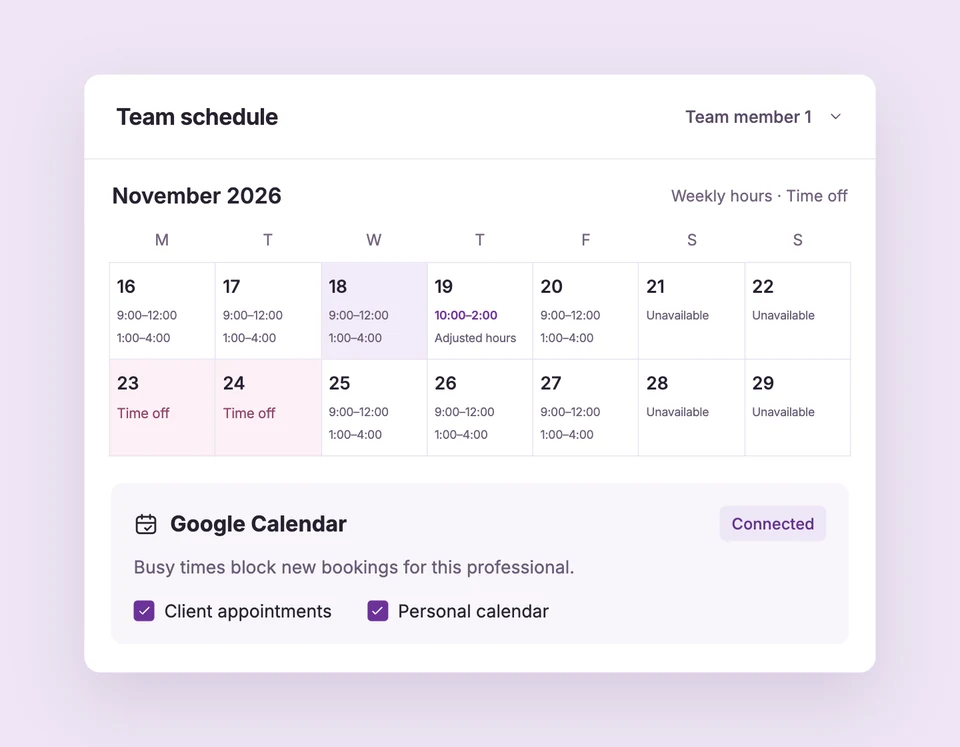
- Assign eligible tutors to each subject or lesson service. A music tutor can keep different working hours from a language tutor without sharing one combined availability schedule.
- Keep lessons inside real working hours
- Set lesson length and preparation buffers. Date-specific hours and time off handle school holidays or one-off schedule changes without silently cancelling existing lessons.
- Ask what the student needs
- Collect a subject, level or learning goal with a booking question. Keep the required fields practical so a parent or student can complete the booking on a phone.
One booking.
Thought through.
Create a 45-minute private music lesson with a 10-minute preparation buffer. Assign the teacher and Music Room A, then ask which instrument and topic the student wants to work on.
Try the interactive booking demoExample setup · illustrative details
- Lesson
- 45-minute private music lesson
- Resource
- Music Room A
- Intake
- Instrument and learning goal
From account
to first booking.
Start with the service your customers ask for most. Your first test booking helps you check the details before going live.
- Add tutors and their weekly lesson hours.
- Create the lesson service, duration and required room.
- Ask one or two useful questions and share the booking link with students.
Choose where customers book.
- Your own websiteShare a hosted page or embed your calendar.
- WixAdd a calendar that fits your Wix site.
- ShopifyTurn your product pages into bookable services.
Compare Free, Starter and Pro for reminders, Google Calendar and waitlist features. Availability and payment options depend on your platform and saved settings.
Before you get started.
Can parents book on behalf of a student?
The booking flow collects the booking contact’s details. Add a practical question for the student’s name or lesson goal when needed, and explain who should complete the form.
Does this manage courses or student progress?
Booking Spot arranges appointments. Use your existing teaching tools for course content, attendance records, progress tracking and recurring lesson packages.
Can I use Booking Spot on my website, Wix or Shopify?
Yes. Standalone businesses can share a hosted booking page or embed the calendar. Wix businesses add the Booking Spot calendar to a page. Shopify businesses connect services to products and add the Booking selector. Follow the setup guide for your platform.
What is included when I start free?
Free includes one active service, unlimited bookings and team members, hosted pages, widget customization, booking questions and waivers, and standard confirmation and update emails. Starter adds reminders and Google Calendar checks. Pro adds waitlists. Payment processing fees are separate.
Your next booking starts here.
Create your account, add your first service and publish a booking page. Start free with one active service, unlimited bookings and your whole team.