
Your booking widget.
Your way of saying welcome.
Bring your booking calendar into the rest of your business. Adjust its appearance, wording and flow in one place, with a real widget preview beside the controls.
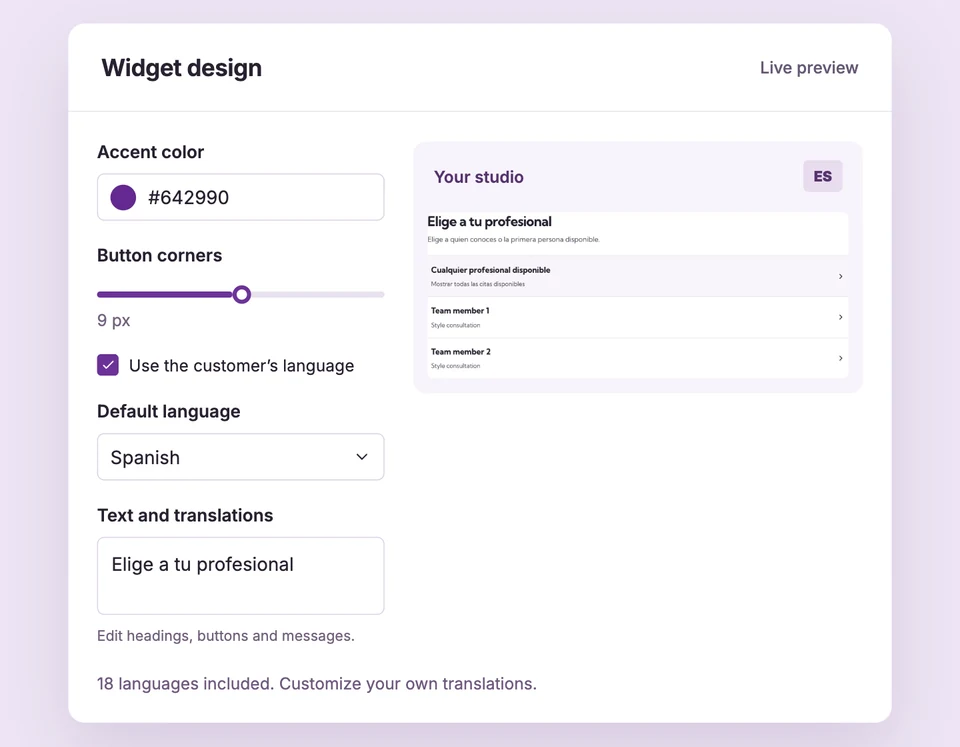
Widget design and text controls are included in Free. Starter and Pro can remove the Powered by Booking Spot footer. Compare plans
Your calendar.
Set up Widget branding for your business.
Choose your appearance
Set the accent color, button corners and supported calendar layout. Check the narrow preview as well as desktop.
Shorten simple bookings
Automatically choose the only service or professional where available. Decide whether eligible Shopify customers enter contact details at checkout.
Save one shared design
Review the iframe preview and save. Your Shopify blocks, hosted pages and shared calendar use the same default widget design.
A branded calendar.
Without rebuilding your site.
Change the accent to match your studio and replace a generic introduction with your own welcome. The preview shows the customer-facing calendar as you edit, so you can check the wording and layout together.
The details
that matter.
Know what the feature does, how it is configured and where its limits are.
- Design stays consistent
- One default widget powers each installation. Save the design rather than rebuilding individual blocks.
- Optional text can stay quiet
- Clear optional introductions and hints when they add no value. Required action labels still need meaningful wording.
- Attribution fits your plan
- Free keeps Powered by Booking Spot linked to the website. Starter and Pro can hide it in Appearance.
Before you get started.
Answers about Widget branding, with guides for the next step.
Can I preview changes before saving?
Yes. The design editor previews the widget in an iframe with sample data. Previewing does not create bookings or send emails.
Can I remove Booking Spot branding?
Starter and Pro can hide the widget attribution. It stays visible on Free.
Are my translations part of the widget design?
Yes. Text & languages has separate language behavior and editable copy. Email template translations are managed separately in Workflows.
Take a closer look.
Try the sample calendar, then follow the guide when you are ready to set up your business.
Explore the related guide