
Appointment buffers & limits.
Built into your schedule.
An open start time is not always enough. Add space before or after an appointment and cap how many bookings a service or professional accepts in a calendar period.
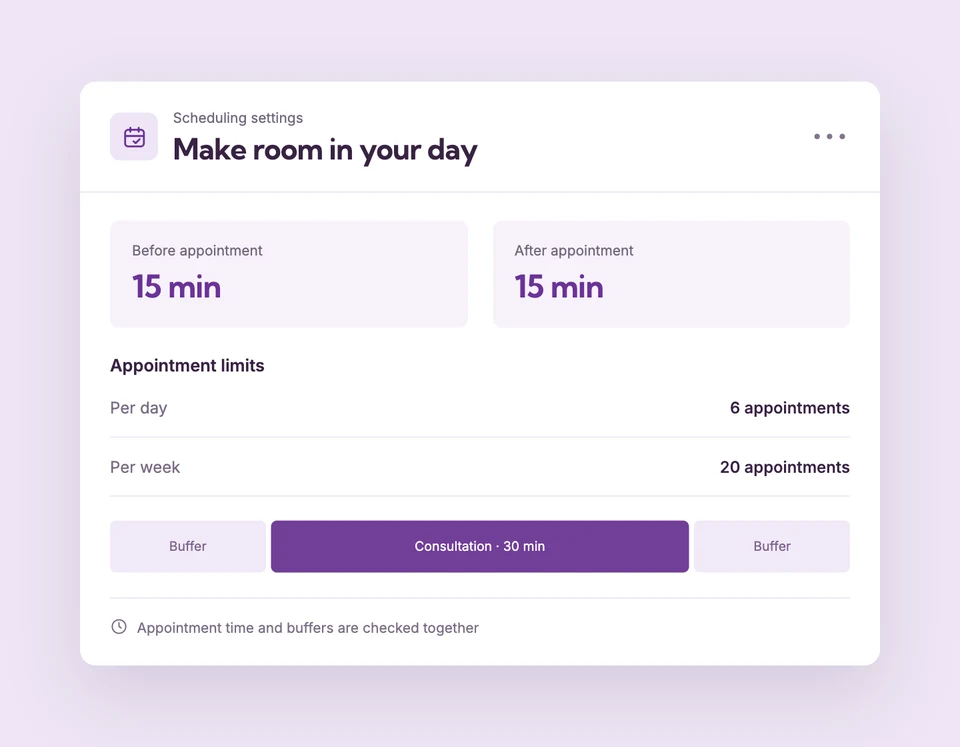
Buffers and booking limits are part of the core scheduling tools included in Free. Compare plans
A little breathing room.
Set up Buffers & booking limits for your business.
Reserve time around the visit
Set Before appointment and After appointment buffers in the service’s Scheduling limits. Each can be 0–120 minutes.
Set the service workload
Enter daily, weekly or monthly maximums across all professionals who provide the service. Leave a limit blank for no limit.
Protect individual workloads
Set professional limits across that person’s services. Every applicable limit must have capacity before a time can be reserved.
A 60-minute visit.
And 15 minutes to reset.
A 10 a.m. appointment with a 15-minute after-buffer occupies the person and assigned resources until 11:15. The full interval must fit working hours and cannot extend through a break or closure.
The details
that matter.
Know what the feature does, how it is configured and where its limits are.
- Count bookings, not minutes
- A daily limit counts appointments starting on that business date. Longer durations do not count as multiple appointments.
- Respect holds and pending requests
- Unexpired holds, pending requests and confirmed bookings consume capacity. Expired, cancelled and declined reservations release it.
- Keep existing bookings
- Lowering a limit stops new reservations once the limit is met. It does not cancel appointments already saved.
Before you get started.
Answers about Buffers & booking limits, with guides for the next step.
How are weeks and months counted?
Limits use the business time zone. A week starts Monday, and the monthly limit uses the calendar month in which appointments start.
Can a service and a person have different limits?
Yes. Both must have room. A service’s remaining daily capacity does not override a professional’s own daily maximum.
Can I change the start-time interval?
The current dashboard does not have an interval selector. It checks potential starts at 15-minute intervals; service duration and buffers are configured separately.
Take a closer look.
Try the sample calendar, then follow the guide when you are ready to set up your business.
Explore the related guide