
Booking in 18 languages.
From the first booking step.
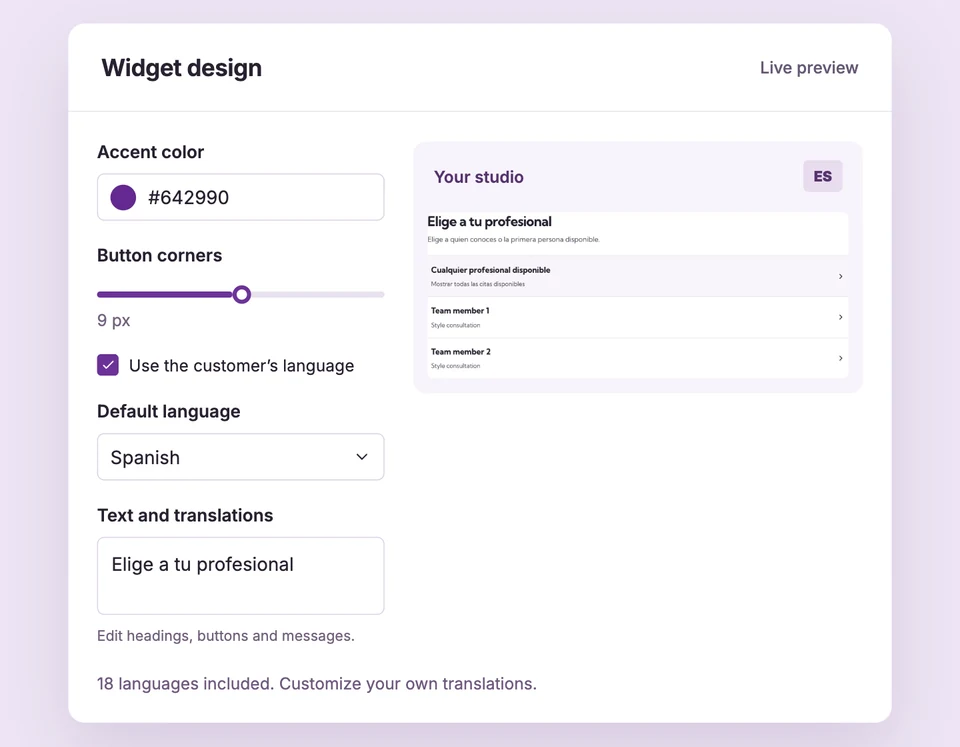
Let the widget use a supported storefront or browser language, or choose your default. Find customer-facing text in one editor and add the wording that fits your business.
Widget text and built-in languages are included in Free. Custom email templates and email translation overrides require Pro. Compare plans
A familiar language.
Set up Languages & translations for your business.
Choose language behavior
Use the customer’s language automatically or set a default. A supplied storefront language takes priority over browser preferences.
Find the message
Search Text & languages for a heading, action, hint or validation message. Edit default wording or select a language override.
Preview and save
Check each language in the actual widget preview. Preserve supported variables and save your design when ready.
A French storefront.
A French booking interface.
Supported language preferences select the widget interface. French Canadian uses the French pack and Brazilian Portuguese uses Portuguese. Your own service titles, question choices and agreements remain as entered rather than being machine-translated.
The details
that matter.
Know what the feature does, how it is configured and where its limits are.
- Broad built-in coverage
- English, Spanish, French, German, Italian, Dutch, Japanese, Polish, Portuguese, Korean, Bulgarian, Czech, Danish, Finnish, Hungarian, Indonesian, Norwegian and Swedish.
- Your words stay your words
- A language-specific override takes priority over your default wording. Built-in copy fills fields that have no custom wording.
- Email languages are separate
- Emails have English and Spanish stock copy. Pro lets you supply additional email translations; widget language packs do not translate emails automatically.
Before you get started.
Answers about Languages & translations, with guides for the next step.
Does Booking Spot automatically translate my service descriptions?
No. Language packs translate the widget interface. Service names, professional names, questions and waiver text keep the wording you entered.
Can I change button labels and error messages?
Yes. Text & languages covers customer-facing headings, buttons, hints and validation messages. Required actions still need clear non-empty wording.
How do I restore a stock translation?
Use default removes the selected field override. If default custom copy remains, it still applies; reset both the general and language overrides to restore stock wording everywhere for that field.
Take a closer look.
Try the sample calendar, then follow the guide when you are ready to set up your business.
Explore the related guide