
Holidays & time off.
Keep the rest of the day bookable.
Keep regular working hours as the starting point, then make exceptions for real life. Block a professional’s absence, adjust one day or close the business for a holiday.
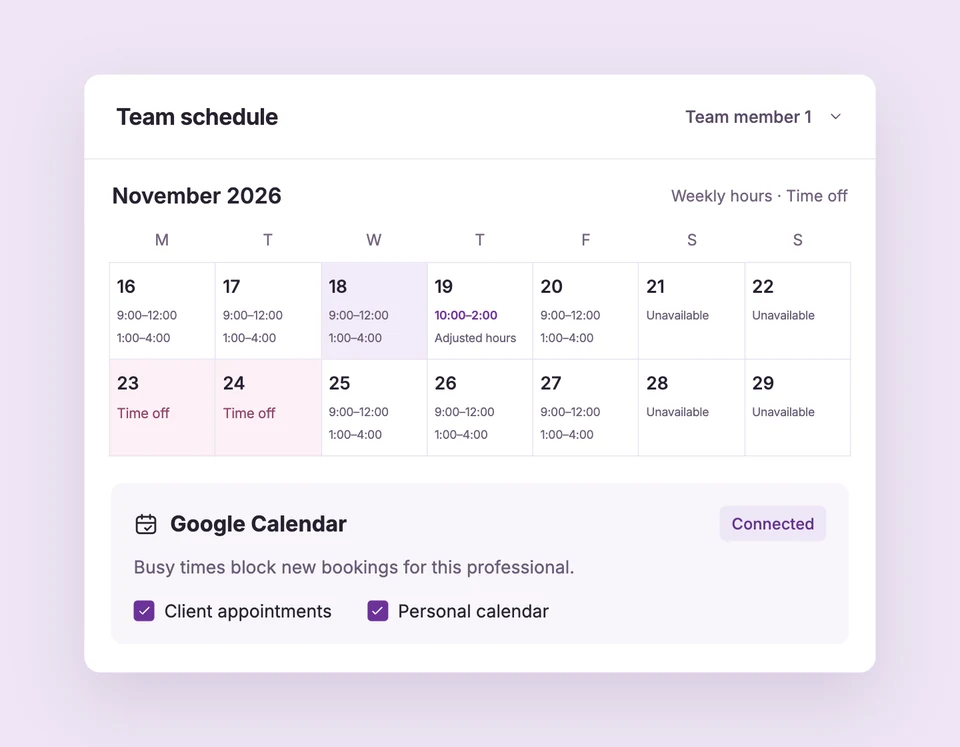
Weekly hours, date changes, time off and business closures are included in Free. Compare plans
Make room for time off.
Set up Time off & holidays for your business.
Choose the scope
Use professional time off for one person. Use a business closure only when everyone should stop accepting appointments.
Pick dates or hours
Add an all-day or partial-day absence, or replace weekly hours with a date-specific schedule. Review the month or three-month view.
Save and review the calendar
New overlapping starts disappear. Existing appointments remain for your team to review and discuss with customers.
Away for the afternoon.
Your colleague is still available.
A professional taking an afternoon off should not close the whole studio. Their time-off period blocks only their new bookings, while another professional can remain available under their own hours.
The details
that matter.
Know what the feature does, how it is configured and where its limits are.
- Preserve the weekly pattern
- A date override changes that date rather than rewriting every future Monday or Friday.
- Inclusive business closures
- Closed from and Closed through both count, using the business time zone. Remove a saved closure and save to reopen it.
- Existing customers are not cancelled
- Availability changes stop new bookings. Your team decides what to do with appointments already on the calendar.
Before you get started.
Answers about Time off & holidays, with guides for the next step.
Does a holiday closure cancel appointments?
No. It blocks new availability. Review existing appointments and arrange any required changes with customers.
Can I plan several months ahead?
Yes. Team has month and three-month views for reviewing working hours and exceptions.
Should I use a business closure for one unavailable room?
No. Business closures affect everyone. Shared resources prevent overlapping bookings, but the current editor does not have a separate resource blackout calendar.
Take a closer look.
Try the sample calendar, then follow the guide when you are ready to set up your business.
Explore the related guide