Reserve preparation and cleanup time
Open Services → [service] → Service setup → Scheduling limits. Set Before appointment (minutes) and After appointment (minutes), then Save service. Each buffer can be 0–120 minutes. A 60-minute haircut starting at 10 a.m. with a 15-minute after-buffer occupies the professional and assigned resources until 11:15 a.m. The full appointment and its buffers must fit within available working periods. A buffer cannot extend through a break or closure.Limit appointments for one service
In the same Scheduling limits section, set Per day, Per week or Per month. These totals apply across all professionals who offer that service. Its Shopify duration/price options share the parent service’s limit.Limit appointments for one professional
Open the professional in Team, select Limits, enter the maximums, then Save professional. These totals apply across that person’s services.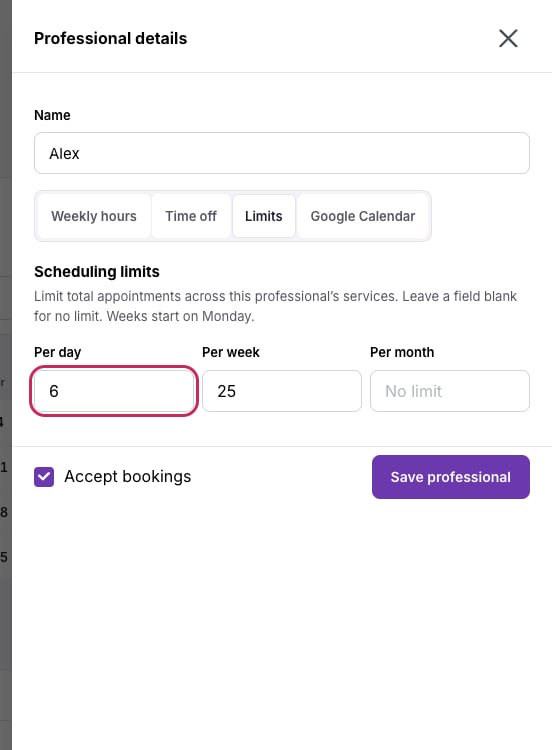
Leave a limit blank for unlimited appointments in that period.
Every configured limit must have capacity. For example, a service limit of 6 per day and a professional limit of 4 means that person can take at most 4 appointments, with the remaining 2 offered by other available people. Appointment length does not change the count.
Pending requests, confirmed bookings and unexpired holds use capacity. Cancelled, declined and expired reservations release it. Completed or no-show appointments still count toward the period in which they started. Lowering a limit does not cancel existing bookings; it stops additional reservations once the limit is reached.
See availability if a time still does not appear after changing a limit.